… Inspire a culture of innovation and collaboration that allows the time and space to explore and experiment with digital tools.
WHAT
UBd Unit plan – BC’s Curriculum- Technology integrated
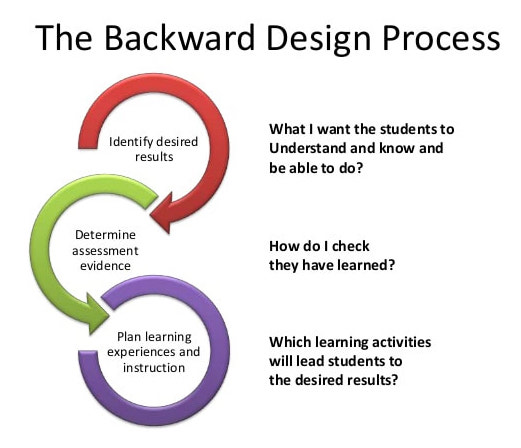
The backward design means design thinking by the end. This methodology follows three stages, which are: Stage 1: Identify desired results; Stage 2: Determine acceptable evidence; Stage 3: Plan learning experiences and instruction (Wiggins). The three stages planning approach in UbD called backward design because it starts thinking by the end. It means thinking about the understanding and the goals to achieve in the learning process. When designing the curriculum, first, it must start determining the results desired to learners achieve. Second, at the assessments, in which pieces of evidence teachers can use to demonstrate the desired understanding. Finally, it is time to select activities, materials, resources that can be useful to achieve the understandings.
https://www.ascd.org/ASCD/pdf/siteASCD/publications/UbD_WhitePaper0312.pdf
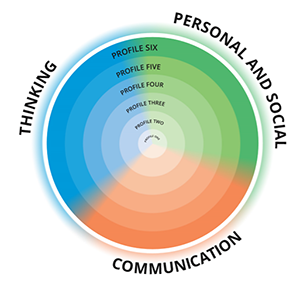
This Unit Plan I designed according to BC’s Curriculum, following the three Core Competencies, which are sets of intellectual, personal, and social and emotional proficiencies. These competencies are through literacy and numeracy foundations, and are central to British Columbia’s K-12 curriculum and assessment system and directly support students in their growth as educated citizens.
https://curriculum.gov.bc.ca/competencies
WHY
Support Synopsis Lesson Plan 1
This lesson is designed to implement Padlet technology because it is an interactive free digital wall software that allows students and teachers to work together, sharing their notes about the reading. In addition, it allows modifying data during the class and later. During this unit, they can implement their thinking to use these notes at the final online video project. It creates an enthusiastic note wall in the classroom, where students can share ideas, knowledge and edit them, providing a group and visual work. (Ditch that Textbook, 2014). Using the differentiation method, the teacher can insert in Padlet the e-book and the web game hunting words. It is easy to differentiate the strategies for each student because Padlet provides all these instructional strategies as a single screen.
Support Synopsis Lesson Plan 2
This lesson is designed to use a video projected at the classroom board and a Web camera to record the video. The video is part of an online video project that will be done using Hippo Video, a free web software. It allows teachers to work with students in all the steps: creating the video, editing, hosting, and sharing to track. Also, it is integrated with Google Classroom. (Hippo Video, 2020). With these two types of technology used, the teacher can engage students in learning and motivate them by creating an online video for a final exhibition. The final video project supports the opportunity for students to demonstrate their learning in different ways, achieving students with more visual and interpretation ability than writing. In addition, it provides diversity in communication skills through students expressing their critical thinking orally. As grade 2 students, they will be using a web camera to simplify the work, and the teacher will help them record. During this unit, they will add more recordings at lesson 4 and edit at lesson 5, sharing ideas and collaborating.
Support Synopsis Lesson Plan 3
This lesson is designed to use an interactive e-learning model program with metamorphic and non-metamorphic life cycles of different organisms package lessons. The e-learning module helps to engage students’ findings with a creative and funny interactive technology device. It also supports diversity in learning by achieving visual audio and active student interaction. For students that need more quiet time learning, It is a successful technology. The students can evaluate their individual learning in real-time, allowing them to return and see the lesson again. The teacher can achieve each student by going through each small group station. The e-learning module can also be used to reinforce students learning in previous lessons related to this unit.
Support Synopsis Lesson Plan 4
The software created by Google Earth, Google Tour Builder, is an exciting way to teachers create their own tour, to share a journey, and highlight locations along the way using Google Earth. Students can view tours that have already been created by their teacher according to the topic. It is an easy and free software to download available at Google website that provides an electronic field trip to real places. It provides more dynamic science studies and more integrated in real-world practice. Also, it increases critical thinking and engagement in students learning.
For most science teachers, a field trip is a challenging because it requires money spends to transport students, more time management and it depends in parents’ acceptance. Another advantage of using an electronic field trip is to go anywhere at the world allowing students to compare the places visited. Using this technology tool, students can explore the places built by the teacher and see some comments or stories added according to the class plan. It brings students and teachers an accessible expedition of each natural place, parks, or cities planned.
The electronic trip field at real places provides students a visual exploration and concrete learning by three dimensions achieving different skills. The pedagogical management can be through learning centres in the classroom. This technology allows free study exercise also to meet the preferences of visual, learners. It benefits diverse learners, not just students who quickly process information through quiet, individual work.
To a successful use in the classroom, I suggest teachers download the software previously in each Chromebook. They were starting by showing how the electronic field trip works and suggesting what the students can explore. After that, the students will be conducted in different centres in small groups. At this moment, teachers will facilitate their learning skills. The learning centres in the classroom help teachers to manage technology use. It also helps to decrease students’ distractions. After this electronic field trip to the natural salmon environment, the students will be ready to think, elaborate their list of responsibilities in the environment and continue the online video record (described in lesson 2).
Support Synopsis Lesson Plan 5
This lesson is the culminating of the unit when students will prepare the materials for an exhibition. They will do an online exhibition by creating an online video and a real exhibition at school with their Canvas panting inspired in First Nations People techniques. The online video will be edited in this lesson by using Hippo Video, a free web software. It allows teachers work with students all the steps: creating the video, editing, hosting, and sharing to tracking. Also, it is integrated with Google Classroom. (Hippo Video, 2020).
The teacher used a webcam to record at last lessons (2 and 4) and will edit the video projecting it at the classroom virtual board as a collaborative work, with students critiquing and sharing ideas. The students will edit in their Chromebook if they want to add teachers editing after classroom meeting. This editing may need a second class to finish. The teacher is the guest of the video recording, but students can have a link and rethink and record the video if they want later.
Using the video recording as an assignment provide reaches children with diverse learning styles. It is visual, verbal and auditive. Also, it engages, motivates students learning, and decreases distraction in the classroom. As a differentiated assignment using diverse learning access, it approaches students to retain the content, think deeply and improve critical thinking. It also provides peers and teachers to share and work together.
HOW
Please check the document below to access my UBd unit plan aligned with BC’s Curriculum and ISTE standards.